Keep Selling. Even When the Internet Goes Down.
A modern POS for Philippine cafés and restaurants — built with a local-first architecture, designed for tablets, and ready to connect your operations from the counter to the kitchen and back office.
Free scoping conversation · Written proposal · No obligation
A WSI POS counter screen showing categories and a product grid of coffee, milk tea, and pastry items priced in Philippine Peso, with a live cart for Table 7 containing a large iced Spanish latte with oat milk, less ice, and an extra shot, an offline indicator confirming orders are saving to the local database, a kitchen ticket rail, and an owner summary of today's sales.
- Built for Philippine F&B
- Local-First Architecture
- Tablet-Friendly
- Kitchen Display Ready
- Per-branch deployment
- Integration-Ready
Your Internet Connection Shouldn't Decide Whether You Can Take an Order.
WSI POS uses a local-first architecture designed so core restaurant operations can continue locally when internet connectivity is unavailable, with data synchronization and connected back-office capabilities available when connectivity returns.
Do not take that on trust — here is a 10-minute test you can run on any POS, including ours, to see what actually happens mid-order.
01Customer
Order placed
02Staff
Counter or tableside
03Local POS
On your store machine
04Kitchen / Bar
Ticket fired
05Printer
Receipt / KOT
06Local database
Written locally first
Cloud sync
When connectivity returns
Owner dashboard
Reporting & visibility
When connectivity is available
- Cloud synchronization can run.
- Management data can be reviewed remotely.
- Connected integrations can operate.
When connectivity is unavailable
- Core locally supported POS operations continue locally.
- Orders remain available to the local system.
- Kitchen workflow can continue where configured.
- Synchronization can resume when connectivity returns.
We are precise about this on purpose: WSI POS makes no uptime guarantees. How much continues locally depends on your configuration and hardware, and we confirm that with you during scoping.
From Order to Kitchen to Checkout — One Connected Workflow.
The counter, the kitchen, and the back office work from the same order. Nothing is retyped, and nothing gets lost between them.
- Available
Order
Take the order
Fast product selection with categories, search, barcode scanning, modifiers, quantities, and notes on the line item.
- Available
Table
Hold it to a table
Dine-in tables, takeaway, and other supported order types, with table status visible to service staff.
- Available
Kitchen
Fire it to the line
Orders are routed to the configured kitchen or bar station, with modifiers and table numbers travelling on the ticket.
- Available
Payment
Settle the check
Cash, card, e-wallet, and configured local payment methods, including split and part-cash part-wallet tenders.
- Available
Reporting
Close the day
Daily sales, VAT collected, discount totals, and an end-of-day reading for the day's transactions.
A Café Order Is Not a Retail Sale. Your POS Should Know That.
Size, temperature, milk, sweetness, ice, and shots are not afterthoughts on a café ticket — they are the order. WSI POS handles them as priced, printable line items that travel all the way to the bar.
Modifier groups you can configure
Modifier names and prices shown here are demonstration data. Your own groups, options, and price deltas are configured during implementation.
See the full milk tea and bubble tea setup·or resto-bars and casual dining
Large Iced Spanish Latte
Qty 1 · Dine-in · Table 7
- Size
- Large+₱40
- Serve
- Iced—
- Milk
- Oat milk+₱30
- Ice
- Less ice—
- Add-on
- Extra shot+₱25
- Sweetness
- 50%—
Demonstration data. The modifier selection, the price delta, and the printed name all travel with the line item to the kitchen or bar station.
The Order Doesn't Stop at the Counter.
Once the order is placed, the kitchen and bar need it — with the modifiers, the table, and the notes intact. WSI POS routes tickets to the stations you configure.
- 1POS
Order placed
The cashier or service staff closes the order at the counter or tableside.
- 2Kitchen
Ticket fired
The order appears on the kitchen display configured for that station.
- 3Bar
Separate station
Drinks can route to their own bar station so the line is not making coffee.
- 4Completed
Cleared when served
Tickets move through their working states and clear when the item is served.
Kitchen display behaviour depends on configuration: whether you run a kitchen screen, a kitchen printer, or both, and which station each category routes to, is set up during implementation. Where a workflow needs a specific setup, we will say so rather than assume it.
Know What You're Selling — And What You're Running Out Of.
Stock is tracked against your products, and every movement is recorded, so the count has a trail instead of a guess.
Product-level stock
AvailableTrack stock per item with a quantity and a low-stock threshold, so fast-moving items surface before they run out.
Stock movement ledger
AvailableEvery movement is recorded as a sale, a cancellation restore, or a manual adjustment — so the count has a trail.
Low-stock visibility
AvailableItems at or below their threshold are flagged on the product list used by the counter and the back office.
Inventory reporting
AvailableStock levels and movements are available to management alongside sales reporting.
Not in the product yet — on our roadmap
Roadmap- Recipe and ingredient-level depletion
- Supplier receiving and purchase orders
- Batch and expiry tracking
- Stock transfers between locations
Your Restaurant Doesn't End at the Counter.
Sales, transactions, average order value, tax collected, best-sellers, and stock alerts — the numbers a manager actually opens the back office to see.
- Daily and monthly sales with a selectable period
- Average order value and transaction counts
- VAT collected and discount totals
- Best-selling products
- Low-stock alerts
- End-of-day reading for handover
Reviewing these figures from outside the store depends on your connectivity and configuration, and is marked integration-dependent where it involves external systems.
Today's sales
₱84,250
Gross, VAT-inclusive
Transactions
312
Orders closed today
Average order value
₱270
Per transaction
VAT collected
₱9,027
12% VAT component
Best-selling products
- Iced Spanish Latte
- Classic Milk Tea
- Butter Croissant
Sales by branch
- Branch 1 · ₱48,900
- Branch 2 · ₱35,350
- Consolidated rollout planned
Inventory alerts
- Oat milk · below threshold
- 12oz cups · below threshold
Illustrative screen with demonstration figures. No WSI customer data is shown.
Built to Grow From One Branch to Many.
Opening a second branch should not mean rebuilding your setup from scratch — and it should not mean one store's problem becomes every store's problem.
How branch deployment works today
Available- Each branch runs its own counter, kitchen display, and local database
- A connectivity problem at one branch does not stop another branch
- New branches are rolled out from a configuration template for consistency
- User roles and permissions are set per deployment
Centralised multi-branch management
Roadmap- Consolidated multi-branch management console
- Centralised product and price publishing across branches
- Group-level reporting and comparisons
- Central user administration
We would rather tell you this now than have you discover it after signing. If consolidated multi-branch control is a hard requirement today, say so during scoping and we will tell you honestly where the product stands.
Use the Hardware That Fits Your Business.
You are not required to buy a single proprietary terminal. WSI POS is tablet-friendly and works with the peripherals you configure.
Android tablet
Counter or tableside
iPad
Counter or tableside
Receipt printer
Thermal, via configured driver
Cash drawer
Kick on receipt print
Barcode scanner
USB or keyboard-wedge
Kitchen display
Screen or tablet at the line
Customer display
Optional, where configured
Kitchen printer
Ticket routing per station
Supports compatible hardware and peripherals depending on configuration. We do not claim universal compatibility — the exact printer, drawer, scanner, and display models are confirmed against your setup during scoping.
Configured for How Business Works Here.
Philippine-ready tax and invoicing configuration is part of the product, not something bolted on later. Here is what is set up with you.
Prices, tenders, and reports are configured in PHP with the peso sign and two-decimal minor units.
VAT is computed at 12% per sale, with the VATable Sales amount printed on the invoice and senior citizen and PWD VAT exemptions applied at checkout.
Your registered Taxpayer Identification Number prints as a structured field, not free text.
The PTU number is a first-class setting and prints as its own line on the invoice.
A controlled invoice sequence with a configurable prefix and reset period keeps receipts auditable.
The 20% discount and VAT exemption under RA 9994 and RA 10754 are applied at checkout, with ID capture and the discount recorded per transaction.
Cash, card, GCash, Maya, and QR Ph are configured per store, with split payments supported.
A reading consolidates gross sales, VAT, discounts, and tender types for the day's transactions.
We configure your registered details and work with your accountant or BIR processor through your own registration requirements.
On BIR registration and accreditation
WSI POS provides Philippine-ready tax and invoicing configuration and implementation support for applicable Philippine tax and invoicing requirements. BIR registration and accreditation are issued through the BIR's own process and are tied to the registered taxpayer and the specific machine — we do not claim that WSI grants BIR approval. WSI can assist with system configuration and implementation requirements, subject to the applicable BIR rules and the customer's specific registration requirements.
Two Ways to Build a POS. Choose the Trade-offs You Want.
There are many POS options, and cloud-dependent systems have real advantages — centralised data, remote management, and simpler updates. Local-first makes a different trade. This comparison is about architectures, not vendors.
| Capability | Local-First POS | Cloud-Dependent POS |
|---|---|---|
| Core local operation | Designed to continue locally | Depends on implementation |
| Internet dependency | Reduced for core operations | Potentially higher |
| Cloud management | Available when connected | Usually central to operation |
| Offline resilience | Core design principle | Varies by product |
| Hardware flexibility | Depends on supported hardware | Depends on provider |
| Data ownership | Database runs at your store | Typically held by the provider |
Every product is different, and we do not make claims about any competitor's current behaviour or pricing. Check a specific vendor's documentation for their architecture. Read the full comparison.
The Platform, and an Honest Label for Each Part.
Every capability on this page carries a maturity label. If something is not finished, it says so.
POS
Fast order entry and checkout at the counter, with search, categories, and barcode scanning.
Tables
Dine-in orders, table status, and order types handled on the same screen as the sale.
Modifiers
Add-on groups for size, milk, sweetness, ice, shots, and toppings — priced and printed per line.
Kitchen
Orders routed to kitchen and bar stations, with tickets carrying modifiers and table numbers.
Inventory
Product stock, low-stock thresholds, and a movement ledger for sales, restores, and adjustments.
Staff
Roles, PINs, and manager approvals for voids, refunds, and discounts.
Reports
Daily sales, VAT, discounts, tender types, and an end-of-day reading.
Multi-Branch
Each branch runs its own deployment today. Consolidated multi-branch management is on the roadmap.
Integrations
Connecting POS data to accounting, ERP, and BI systems is scoped per deployment.
AI-Ready
Sales, inventory, and customer data are structured so future intelligence has something to work with.
Your POS Should Be More Than a Cash Register.
A POS already holds the most honest data in the business: what sold, when, at what price, and what ran out. WSI POS is structured so that data can eventually feed something more useful than a printed report.
WSI POS Roadmap — not available today
Roadmap- Sales insights and anomaly callouts
- Inventory forecasting and reorder suggestions
- Automated management reports
- Customer segmentation
- Marketing and loyalty automation
- Operational recommendations
- An AI assistant for restaurant owners
We are showing you the direction, not selling you a feature that does not exist yet. Anything here will be labelled as available only when it actually ships.
Priced Per Deployment, Not Per Marketing Tier.
We are not the cheapest option on the market, and we are not trying to be. We put the money into local-first architecture, Philippine configuration, and implementation support. Here is how a WSI POS engagement is structured — the actual figure comes from scoping your counters, branches, and modules.
Starter
Single-location cafés and food kiosks
Software
- POS software licence for one counter
- Tablet-friendly, bring-your-own-device option
- Core restaurant features: menu, modifiers, tables, discounts
- Philippine peso and VAT configuration
- Receipt printing and end-of-day reading
Custom quote after scoping
Professional
Growing single or two-counter restaurants
Software + hardware + implementation
- Everything in Starter
- Kitchen display system and station routing
- Inventory and stock movement tracking
- Advanced reporting for management
- Hardware package, installation, and staff training
Custom quote after scoping
Multi-Branch
Restaurant groups and franchise operators
Software + hardware + implementation + services
- Everything in Professional
- Per-branch deployment and configuration templates
- Group reporting and branch-level visibility
- Integration scoping with accounting, ERP, and BI
- Priority support and rollout project management
Custom quote after scoping
What is quoted separately
Software
Licensed per deployment, based on counters, kitchen displays, and the modules you need.
Hardware
Quote-based. You can supply your own compatible peripherals or have WSI package them.
Implementation
Scoping, configuration, menu import, staff training, and go-live support.
Optional services
Integrations, additional branch rollouts, on-site visits, and extended support terms.
This is the summary structure. For what moves the number, what is included, and what is quoted separately, see how a WSI POS deployment is scoped.
We Don't Just Give You a Login.
A POS is a deployment, not a download. Configuration by people who have done it, hands-on training, and someone on the floor through your first days of service.
- 1
Configure the business
Legal name, registered details, currency, timezone, and invoice settings.
- 2
Import your menu
Products, categories, and prices loaded into the catalogue.
- 3
Set up modifiers
Size, milk, sweetness, ice, shots, and add-ons grouped and priced.
- 4
Configure taxes and discounts
VAT configuration, invoice settings, and senior and PWD discount setup.
- 5
Configure hardware
Receipt printer, cash drawer, kitchen printer or display, scanner.
- 6
Train your staff
Cashiers on the counter flow, managers on approvals and end-of-day.
- 7
Test the workflows
A full dry run of ordering, firing, payment, and reporting before go-live.
- 8
Go live
We stand up the counter and stay with you through the first days of service.
- 9
Support
Ongoing support for configuration changes, new branches, and questions.
We are a technology partner, not a software vendor — the same team that configures your store is the team you call when something changes.
See It Running.
Real screens from a running WSI POS deployment, from the counter to the kitchen to the back office.
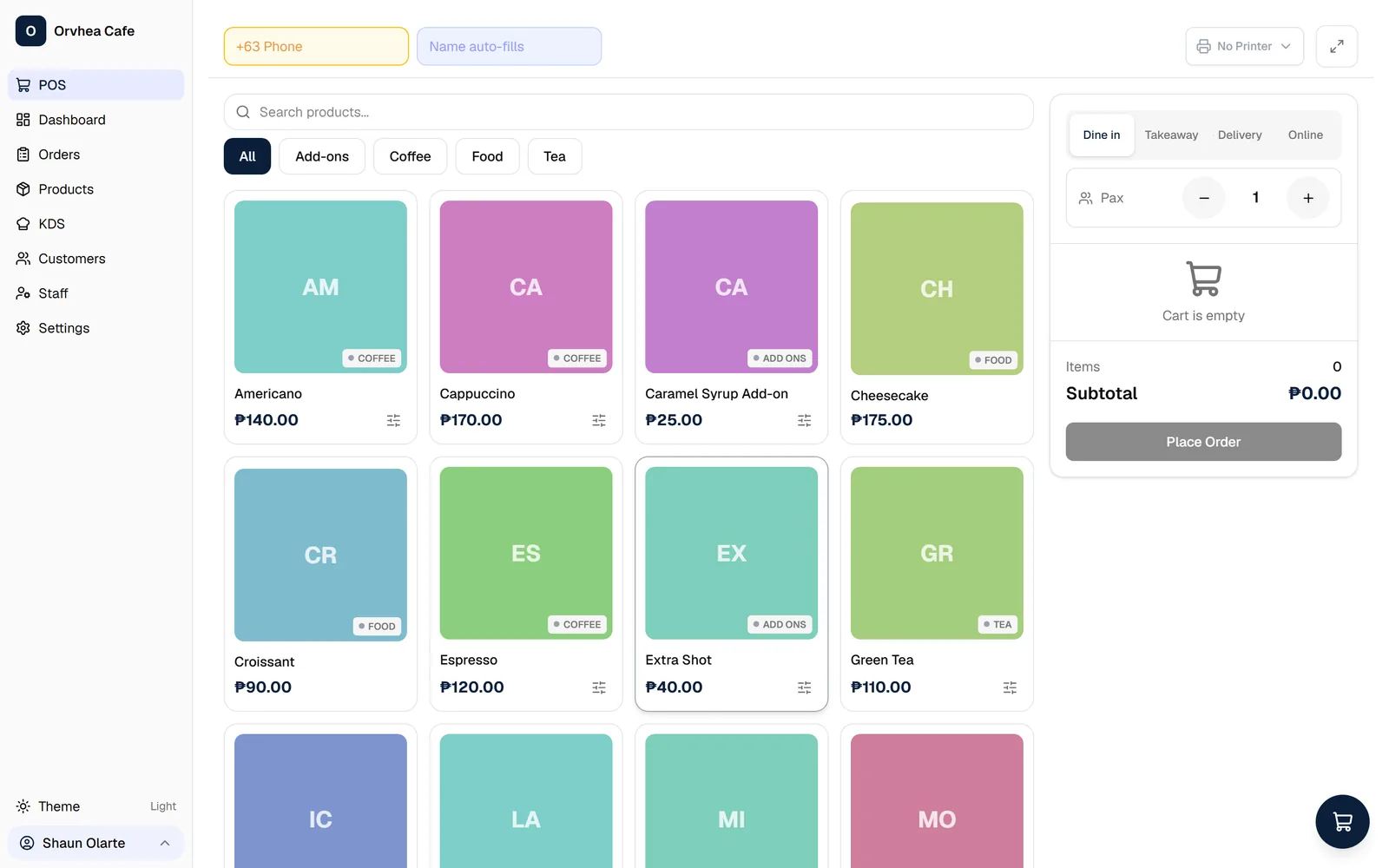
The Counter
Product grid, categories, order type, and the live cart on one screen. Every price in Philippine Peso.
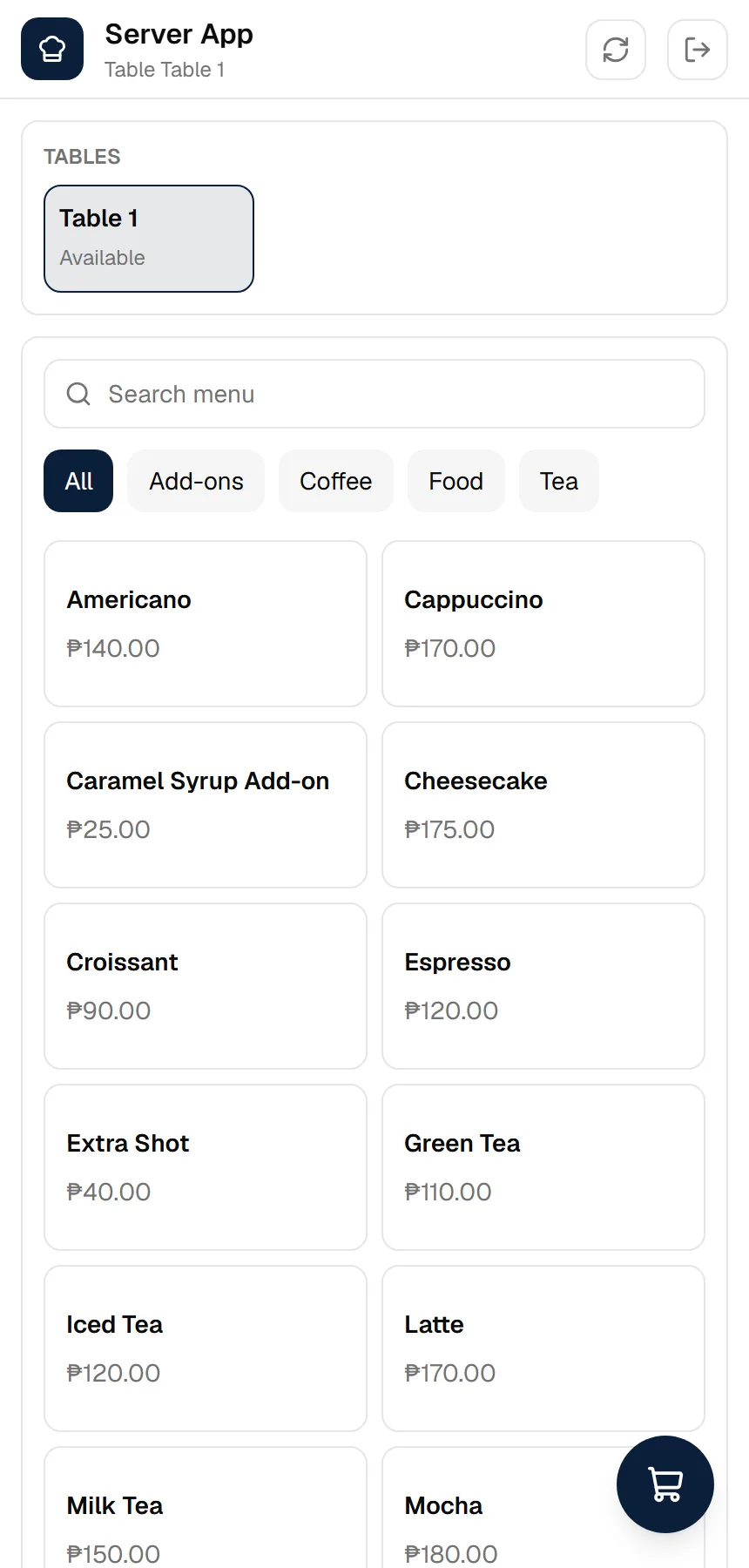
Tableside
Service staff take orders at the table from a phone or tablet, with table availability at a glance.
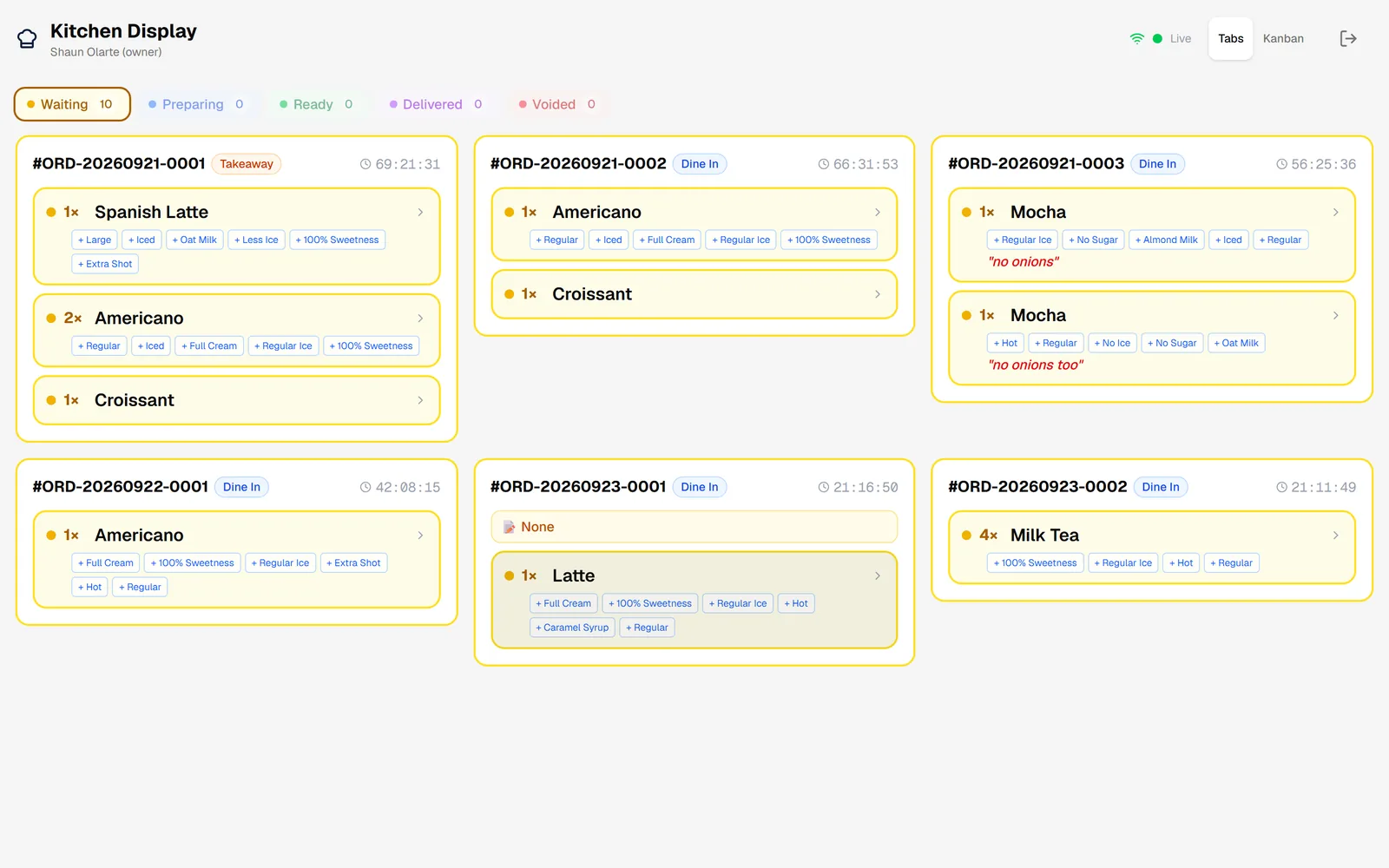
The Kitchen
Live tickets carry their modifiers and table number, and move through their working states.
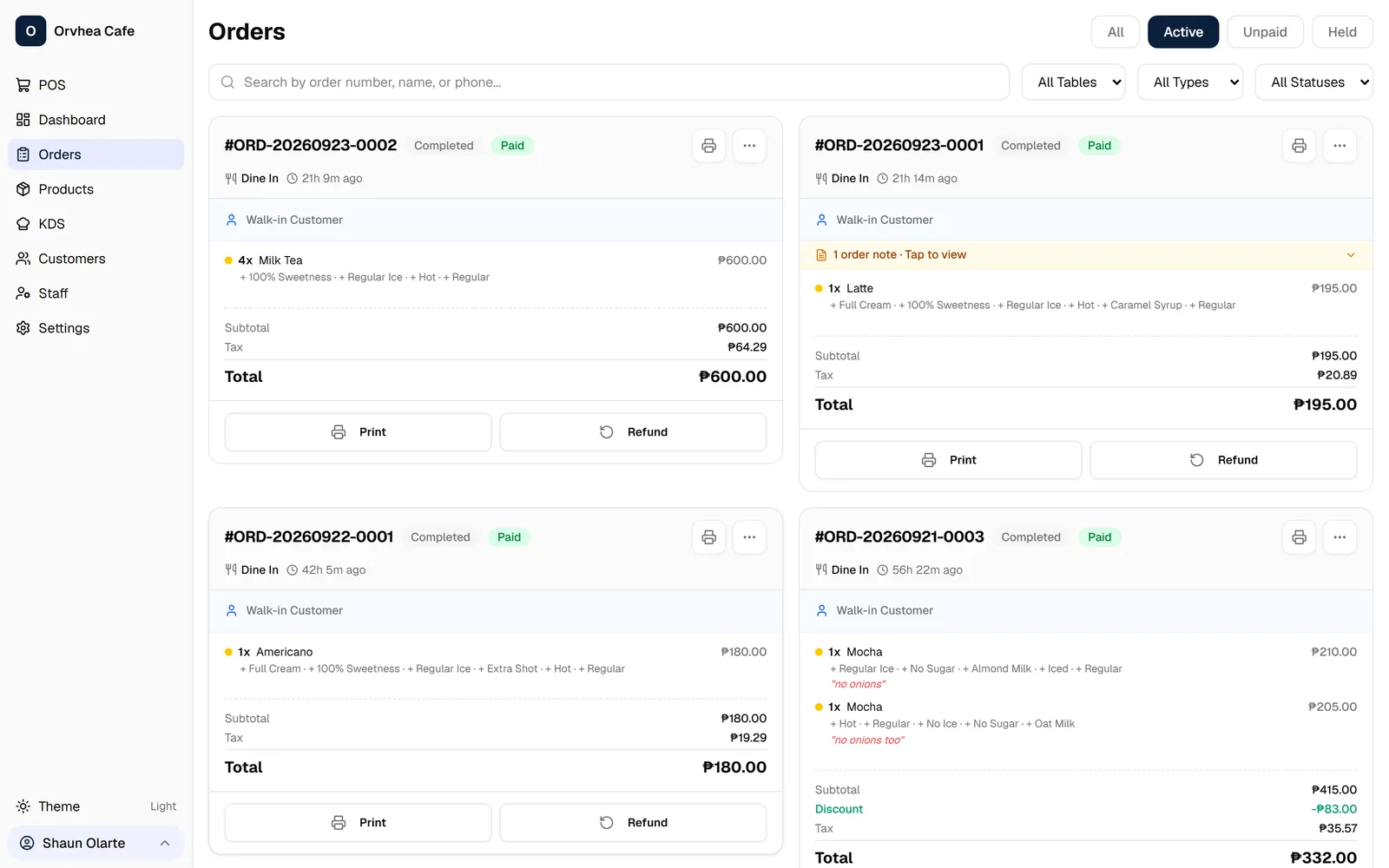
Orders
Every sale with its line items and tax breakdown. A ₱600.00 sale shows ₱64.29 of VAT inside it.
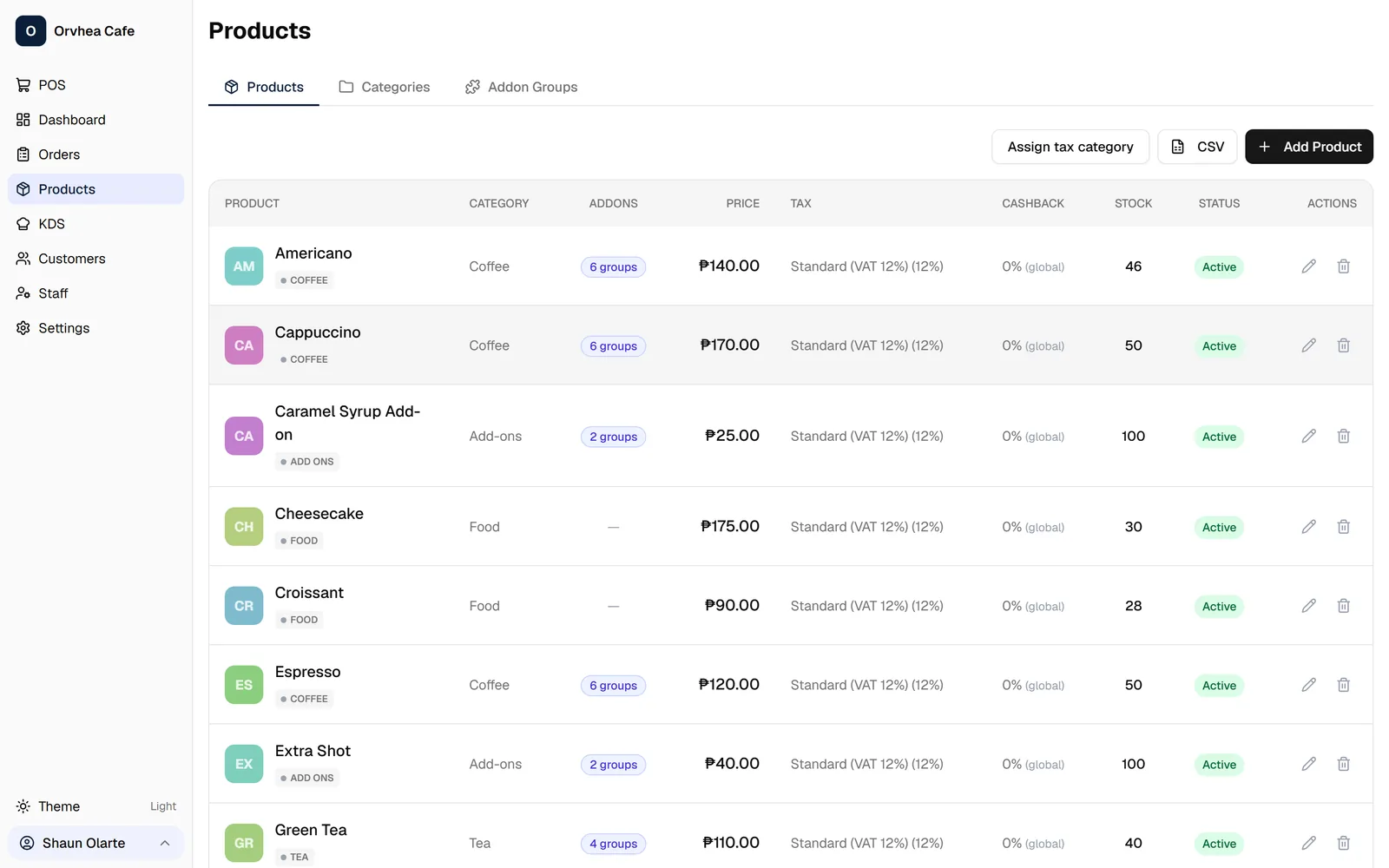
Products
Your menu, categories, modifiers, and stock thresholds, edited without touching the counter.
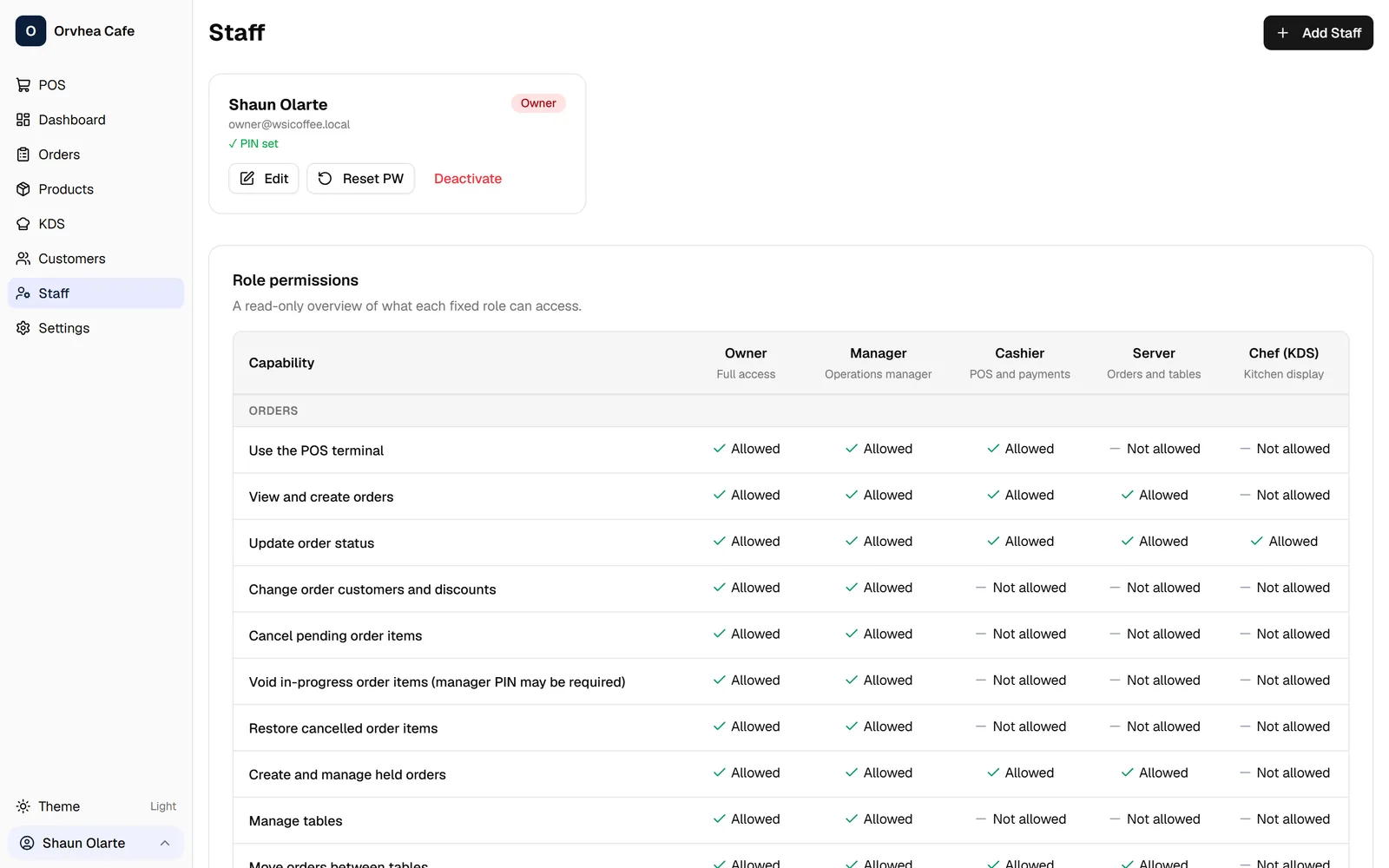
Staff
Staff accounts, roles, and PINs for the counter, the kitchen, and manager approvals.
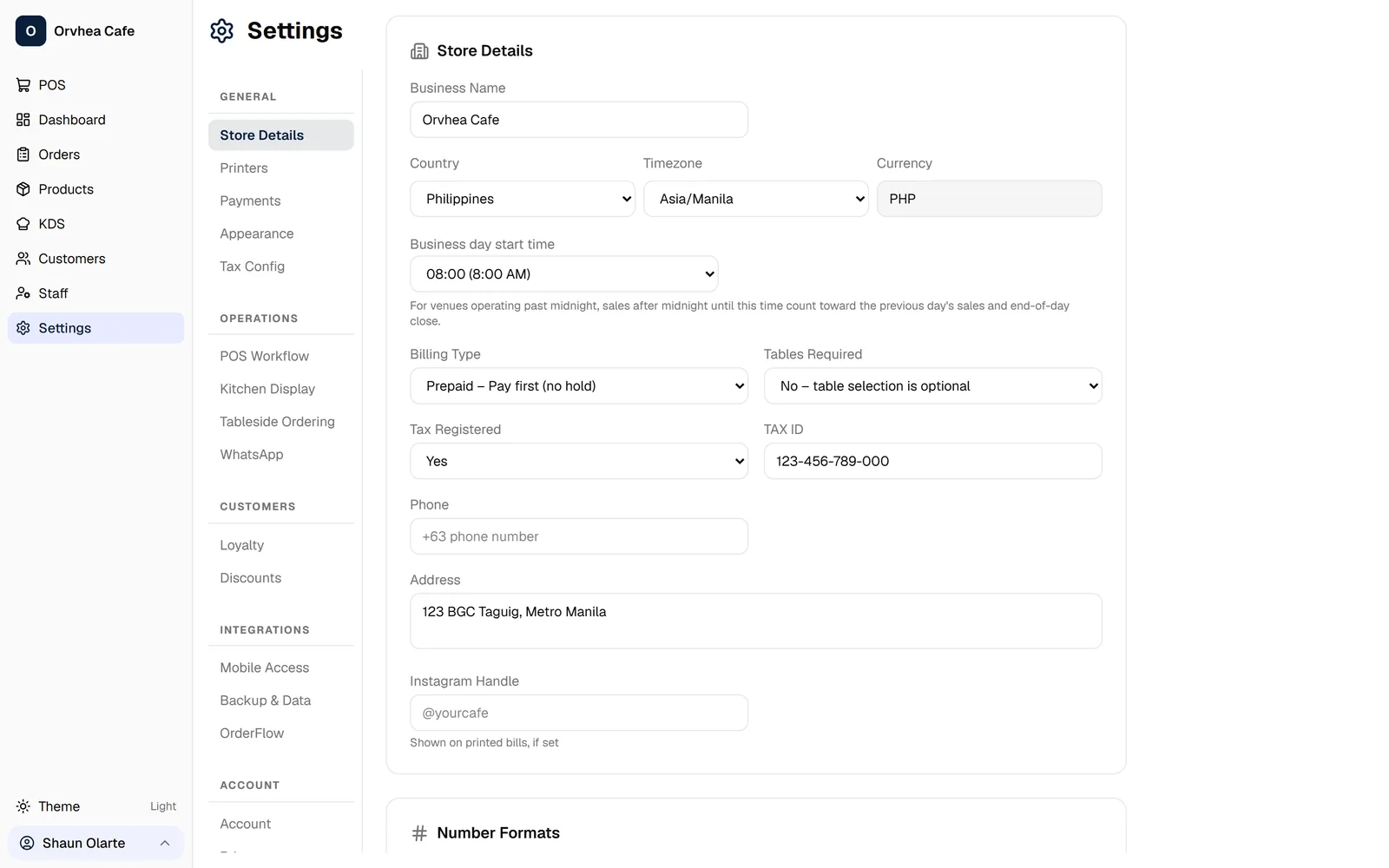
Settings
Store details, printers, payment methods, tax configuration, and discount rules in one place.
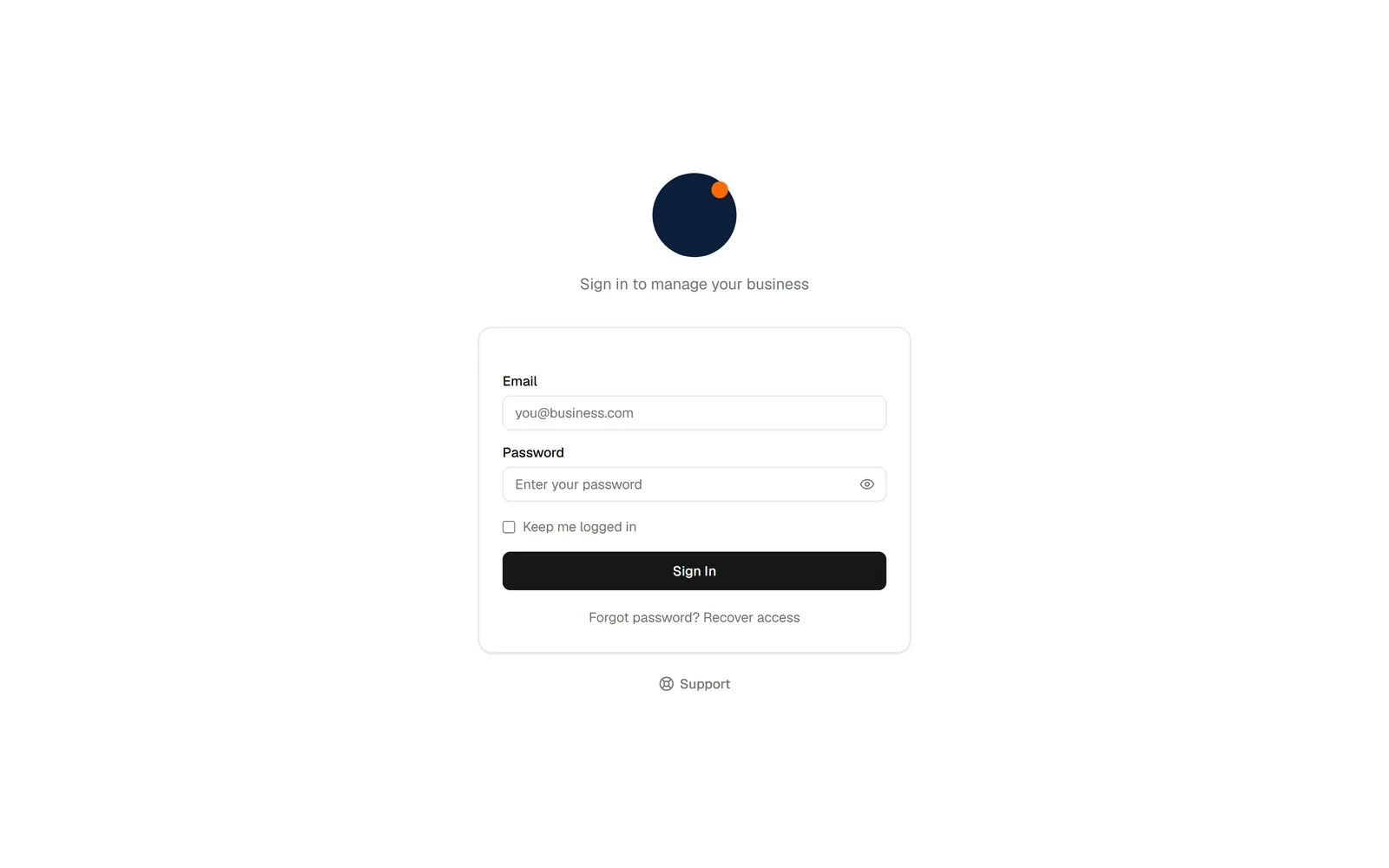
Sign In
Email and password access, scoped by role so the kitchen never sees the back office.
Screens captured from a live WSI POS deployment. Product names, prices, and staff shown are demonstration data.
Questions Restaurant Owners Actually Ask
The short version is below. The full FAQ covers outages, hardware, VAT and receipts, migration from another POS, and data ownership.
Does WSI POS keep working when the internet goes down?
Core locally supported POS operations are designed to continue locally. Orders are written to a database on the store machine, and the counter can keep taking orders and printing receipts during an outage. Synchronization can resume when connectivity returns. We will not claim the system is immune to outages — how much continues locally depends on your configuration, which we confirm during scoping.
Is WSI POS BIR accredited?
WSI POS is built with Philippine-ready tax and invoicing configuration: 12% VAT computed per sale with a printed VATable Sales line, structured TIN and Permit To Use lines that print on the invoice, controlled invoice numbering, and an end-of-day reading. VAT-exempt and zero-rated sales categories of the kind a BIR-accredited invoice also shows are on our roadmap rather than in the product today. BIR registration and accreditation are issued through the BIR's own process and are tied to the registered taxpayer and machine, not to a software vendor alone. WSI can assist with system configuration and implementation requirements, subject to the applicable BIR rules and your specific registration requirements.
What hardware do we need?
Typically a computer or tablet at the counter, a thermal receipt printer, a cash drawer, and a screen for the kitchen display. WSI POS supports compatible hardware and peripherals depending on configuration. We confirm the exact list during scoping and can package or advise on it.
Can it run across multiple branches?
Each branch runs its own counter, kitchen display, and local database, so a problem at one branch does not stop another. New branches are rolled out from a configuration template so settings stay consistent. A consolidated multi-branch management console with centralised publishing and group reporting is on our roadmap.
What does WSI POS cost?
Deployments are scoped individually. Software is licensed per deployment, hardware is quote-based, and implementation covers configuration, training, and go-live. We present the structure and a written proposal rather than a single headline figure, because the number depends on counters, branches, and modules.
How does WSI POS connect to the rest of our systems?
Connecting POS data with accounting, ERP, BI, or customer systems is scoped per deployment and depends on the systems involved. We mark anything integration-dependent rather than assuming it out of the box.
Ready to Modernize Your Restaurant?
See how WSI POS can fit your actual restaurant workflow — from taking the order to getting it into the kitchen and giving management better visibility.
WSI POS is in beta. Capabilities on this page are labelled by maturity so you know what is available today and what is still being built.
WSI POS is one product in the WSI platform.
Web Solutions Inc. builds ERP, CRM, BI, LMS, and AI platforms for Philippine organizations. POS data can be connected to those systems where your deployment requires it.
POS cost calculator·Menu margin calculator·Pricing·FAQ·Contact